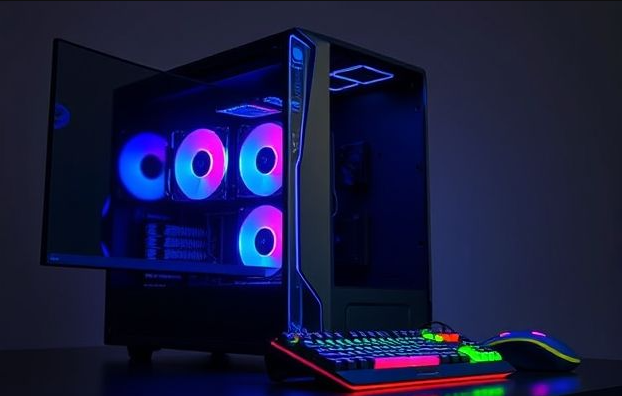
Ready to finally jump into the world of PC gaming? Buying a new gaming PC is an incredibly exciting decision. You will unlock stunning graphics, buttery-smooth gameplay, and lightning-fast load times. This friendly guide walks you through the whole process. We cover everything from essential components to deciding between a pre-built computer and a custom gaming PC build.
Discover related topics
by Indotex Digital
Why a Dedicated Gaming PC Changes Everything
A PC built specifically for gaming gives you far more power than a standard machine or console. The hardware is designed for maximum performance. This means your favorite games will look and feel better than ever before. You can run all the newest titles with the settings cranked up.
Unrivaled Graphics and Speed
Gaming PCs rely on powerful, dedicated graphics cards. These components render games with amazing visual fidelity. You get to play at higher resolutions, like 1440p and 4K. Frame rates stay high, making the action fluid and incredibly responsive. This level of visual and performance quality totally changes your gaming session.
Full Control Over Upgrades
Unlike a console, a PC is a flexible machine. You can easily swap out old components for newer ones later on. This flexibility extends your machine’s useful life for many years. You avoid buying a whole new system every few years. You also customize the machine to perfectly match your style. Add RGB lighting, choose a unique case, or install better cooling.
More Than Just a Game Machine
Your powerful gaming hardware handles demanding work tasks effortlessly. You can stream your gameplay to online viewers. You can edit 4K video files without lag. You can run complex software for creative projects. A gaming PC serves as an excellent all-around workstation too.
Breaking Down the Core Gaming PC Components
To buy a gaming computer wisely, you must understand its main parts. Each piece of hardware has an important job. Let us simplify the major players.
The Graphics Card (GPU): The Visual Boss
The GPU is the most important component for gaming performance. It generates every image you see on your screen. The NVIDIA GeForce RTX series and AMD Radeon RX series are the top manufacturers. A stronger GPU means better visual quality and higher frame rates. You must choose a GPU that fits your monitor’s resolution and refresh rate.
The Processor (CPU): The System’s Brain
The CPU handles all the game logic, physics, and background programs. You need a capable CPU to avoid limiting your powerful GPU. A good CPU, such as an Intel Core i5/i7 or AMD Ryzen 5/7, keeps your graphics card busy. This gives you the best performance. The latest chips, like AMD Ryzen 9000 series, offer the quickest speeds.
System Memory (RAM): Quick Access Storage
RAM holds the temporary data your CPU needs instantly. For most modern gaming, 16GB of RAM is the sweet spot. This amount easily handles most games today. If you plan to stream or multitask heavily, upgrading to 32GB provides extra smoothness. Look for fast DDR5 RAM in any new PC build.
Storage: SSD Speed is King
Game loading speed depends on your storage drive. Solid State Drives (SSDs) are vastly faster than older Hard Disk Drives (HDDs). An NVMe SSD provides the absolute best speed for quick boots and short load screens. A smart setup uses a 1TB or 2TB SSD for your operating system and favorite games. You can add a cheaper, larger HDD for other files and older games.
Motherboard and Power Supply
The motherboard connects every part of your system. It must have the correct socket for your CPU. The Power Supply Unit (PSU) delivers electricity to all components. You need a reliable PSU with enough wattage for your hardware. Never save money by buying a cheap PSU. A quality one protects your expensive parts.
Pre-built Gaming PC vs. Building It Yourself
When you decide to buy a gaming PC, you face a choice. Do you purchase a machine that is already assembled? Or do you build the machine yourself?
The Ease of a Pre-built Gaming Desktop
A pre-built computer offers the easiest solution. The manufacturer handles all the assembly, cable management, and testing. The system works immediately out of the box. Most come with a full system warranty and customer support. This option saves you time and stress. Companies like iBUYPOWER and Dell Alienware offer many ready-to-go options.
| Feature | Pre-built PC | Custom PC Build |
|---|---|---|
| Setup Difficulty | Very Easy, ready to go | Requires basic technical skill |
| Time to Use | Instant access | Takes a few hours to build |
| Cost Efficiency | Higher total price | Lower price for the same parts |
| Warranty Coverage | One system-wide warranty | Separate warranties for each part |
| Customization | Limited component options | Complete control over every part |
The Joy of Building Your Own Gaming PC
Building a PC gives you complete control over the design. You select every single component. This freedom often saves you money, since you avoid assembly labor costs. You get exactly the parts you want without any compromises. Building a PC also teaches you how it works, which makes troubleshooting easier later. This choice is great if you enjoy hands-on projects. Many helpful video guides are available for new builders.
Choosing the Right Gaming PC for Your Budget
Your budget determines the performance level you can expect. Here is a breakdown of common price ranges for a new gaming rig.
Entry-Level Gaming PCs (Under $1,000)These PCs are great for new gamers or those on a tight budget. They handle all games at 1080p resolution. You can play popular esports titles with smooth frame rates. Look for an Intel Core i3/Ryzen 5 CPU paired with a GPU like the NVIDIA RTX 4060 or AMD RX 7600. This is an excellent starting point.Mid-Range Gaming PCs ($1,000 to $1,800)This range is the best value for most people. These machines deliver smooth 1440p resolution gaming. Many can run games at high refresh rates too. Aim for an Intel Core i5/Ryzen 7 CPU. Look for a GPU like the NVIDIA RTX 4070 Ti or AMD RX 7800 XT. This tier offers amazing visuals without the most extreme prices.High-End Gaming PCs ($1,800 and Up)
High-end PCs are for those who want the absolute best performance. They handle every modern game at 4K resolution with the highest settings. Expect top-tier CPUs like the Ryzen 7 9800X3D or Core i9. The graphics card is usually an extremely powerful model, such as the NVIDIA RTX 4090 or upcoming RTX 5080. These systems are also perfect for professional content creation.
Smart Tips for Buying Your First Gaming PC
Keep these points in mind as you shop for your new machine. They will help you maximize your investment.
Do Not Neglect Cooling
Powerful PC parts generate a lot of heat. Good cooling keeps your temperatures low. Low temperatures mean your PC performs consistently fast. Simple air coolers work well and are affordable. Custom liquid cooling offers superior performance and a clean look. Make sure your PC case has good airflow and enough fans.
Remember the Peripherals
A great PC needs great accessories to feel complete. You must buy a gaming monitor that matches your PC’s power. A high-refresh-rate monitor, like 144Hz or 240Hz, makes fast-paced games feel much better. Also budget for a comfortable gaming keyboard and mouse. These items are crucial to your overall experience.
Plan for Future Upgrades
Think about the longevity of your machine. Choose a motherboard with a current socket, like AMD’s AM5, for future CPU changes. Buy a slightly higher wattage PSU than you need right now. This extra capacity allows you to upgrade to a stronger GPU down the road. Planning ahead saves you money later.
Conclusion
You now have a solid foundation for choosing the best gaming PC desktop. Focus on balancing the GPU and CPU first. Then, select the right amount of RAM and storage for your daily needs. Will you enjoy the simplicity of a pre-built computer, or will you take on the challenge of building your own PC gaming rig? Share your plans in the comments below, and get ready for some amazing gaming!